
EzColorize
Colorize & Restore
Photo ColorizerHOT

Colorize and restore black & white photos

AI Color MatchNEW

Match photo colors to a reference image

Photo RestorationHOT

Restore old photos and recover details

Photo EnhancerNEW

Unblur, sharpen, and upscale photos up to 4x

Edit & Cleanup
Remove People from PhotoNEW

Brush over unwanted people and restore the background

Background Remover

Remove backgrounds and add colors or your own images

AI Open Eyes – Fix Closed Eyes in PhotosNEW

Open closed or half-closed eyes in a photo with AI. Choose the person in a group photo, compare the edit, and download your result.

Create & Generate
ChatGPT GIF GeneratorNEW

Animate a photo or image into a looping GIF

Free
Image ConverterFREE

Batch convert JPG, PNG, and WebP images

Image ResizerFREE

Resize JPG, PNG, and WebP images locally

Keep On Steppin AI Dance

Create a synchronized five-character dance video.

Pricing
HomePhoto Enhancer

Photo Enhancer – Unblur, Sharpen & Upscale Online

Improve photo clarity, remove blur and digital noise, or upscale low-resolution images 4x in seconds. Upload a portrait, landscape, or product shot — free daily credits included.

The same outdoor portrait sharpened and enhanced After
A blurry, low-resolution outdoor portrait before enhancement Before

Illustrative example — soft low-resolution portrait, before and after.

Upload Image

Drag & drop or click to browse

Enhancement Mode

Output Format

SecureFastAI enhanced

JPG, PNG or WebP · Up to 1.0 megapixels — larger photos are resized automatically.

Photo Enhancement Examples

Drag the slider to compare illustrative low-resolution inputs with enhanced outputs. Actual results vary with the photo and selected mode.

Enhanced sharp portrait of the same man with clear eyes, glasses, and fabric detail After
Blurry, low-resolution portrait of a smiling older man with glasses at a cafe Before

Sharpen a soft, out-of-focus portrait

Soft focus and low-resolution blur are cleared up while keeping natural skin texture, eyes, and expression intact.
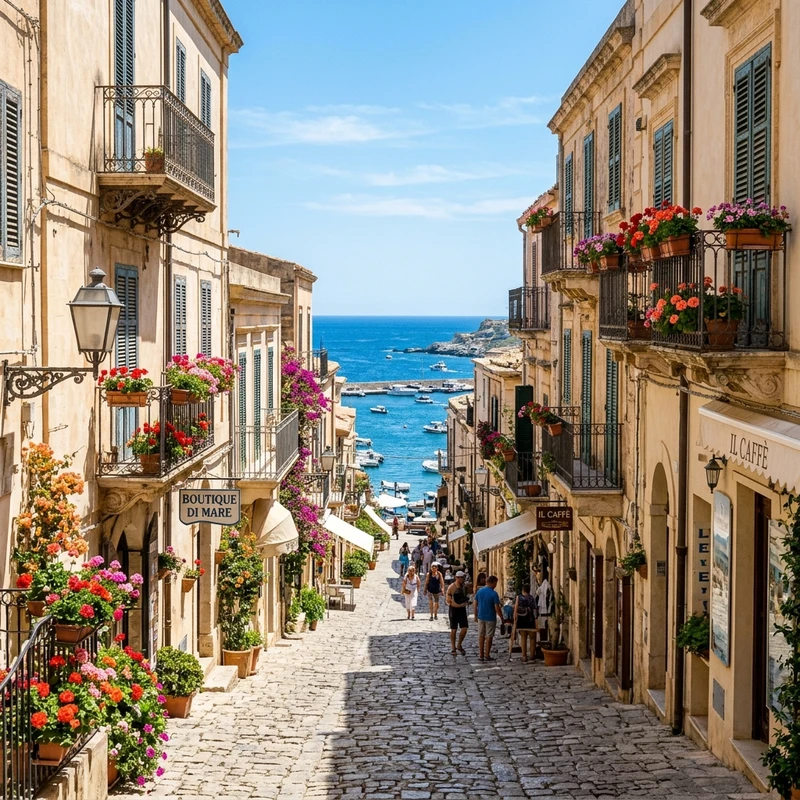
Upscaled high-detail photograph of the sunlit stone street and sea After
Low-resolution, pixelated coastal European street photograph Before

Upscale low-resolution travel and architecture photos

Fine stonework, iron balconies, and distant textures become crisp enough for large displays and prints.
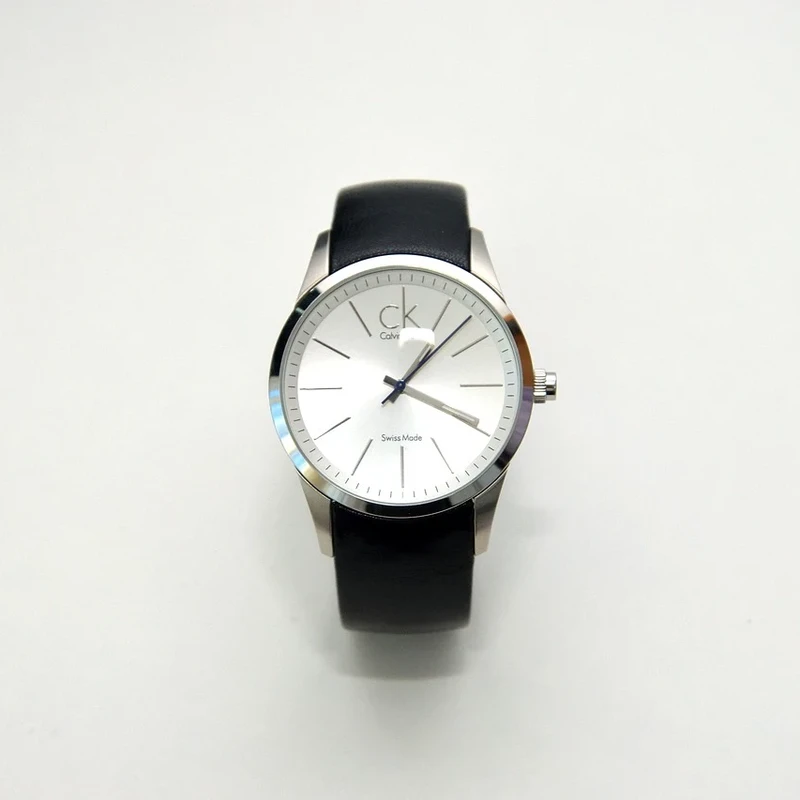
Clean, sharp studio product photo of the same wristwatch After
Blurry, compressed studio product photo of a wristwatch Before

Clean up noisy and compressed product photos

Compression artifacts and soft edges are cleared up so dial markings, metal reflections, and textures look crisp.

What Can AI Enhance?

Whether a shot is slightly soft, noisy from low light, compressed by messaging apps, or simply too small to print, one pass cleans it up cleanly.

1

Unblur Soft Photos

Recover crisp edges and fine structure from slight motion blur, missed focus, and handheld camera shake.

2

Remove Noise & Compression

Clean up low-light ISO grain and blocky JPEG artifacts from messaging apps and social downloads.

3

4x Resolution Upscaling

Switch to 4x Upscale to multiply pixel dimensions for large displays, crisp product listings, and prints.

4

Natural Detail Preservation

Keep authentic skin texture, facial features, lighting, and colors true to the original photograph.

How It Works

Step 1

Upload Your Photo

Drop a JPG, PNG, or WebP photo from your phone, camera, or computer.

Step 2

Choose Mode & Format

Pick Standard for fast clarity and denoising, or 4x Upscale for high-resolution enlargement.

Step 3

Compare & Download

Drag the before/after slider to inspect the result, then download in PNG, JPG, or WebP.

Why Choose Our Photo Enhancer?

Two Focused Modes, Zero Clutter

Standard handles everyday blur, noise, and clarity in one click; 4x Upscale multiplies resolution when you need print-ready detail.

Consistent Photographic Quality

Tuned for natural sharpness without plastic skin, harsh halos, or artificial oversaturation.

Flexible Output Formats

Export your enhanced image directly as PNG, JPG, or WebP to match web, print, or e-commerce requirements.

Free to Try Daily

Every visitor gets a daily allowance of free credits for Standard enhancements, with no software install required.

Use Cases

Real photo problems solved in one pass — with the recommended mode for each scenario.

Standard · Free daily OK

Blurry Portraits & Candid Moments

Save one-of-a-kind family photos affected by missed focus, slight camera shake, or dim indoor lighting — without turning skin plastic.

  • Sharpens eyes, hair, and natural expression
  • Reduces low-light ISO grain cleanly
  • Keeps authentic skin texture intact
Standard · Free daily OK

Compressed Chat & Social Photos

Photos forwarded through WhatsApp, Messenger, or older social albums often arrive soft and blocky from repeated re-compression.

  • Removes JPEG banding and mosquito noise
  • Recovers clean edges and fine detail
  • Ready to share or archive in PNG or WebP
Standard or 4x Upscale

E-Commerce & Product Listings

Upgrade phone-shot catalog photos for Shopify, Etsy, or Amazon so shoppers can zoom in on stitching, labels, and surface finishes.

  • Crisp product edges and material texture
  • Cleaner backgrounds and subtle lighting
  • Consistent quality without a reshoot
4x Upscale

Cropped Shots & Large Prints

When you crop in on a distant subject or prepare an older digital file for framing, 4x Upscale adds the pixel resolution needed for print.

  • Multiplies width and height 4x
  • Avoids jagged edges on large displays
  • Suited for posters, albums, and canvas
4x Upscale

Real Estate & Travel Photography

Bring out crisp architectural lines, woodwork, foliage, and distant scenery in property listings and travel galleries.

  • Preserves straight lines and stonework
  • Cleans shadow noise in indoor rooms
  • Delivers high-res gallery-ready files
Standard · Free daily OK

Older Digital & Scanned Albums

Refresh soft 2000s digicam shots, early smartphone photos, and clean flatbed scans so everyday memories look clear on modern screens.

  • Lifts haze and digital softness
  • Keeps original color tone and framing
  • Pair with Old Photo Restorer for torn prints

Privacy and Trust

How your uploaded photos are processed, protected, and automatically deleted.

Third-Party AI Processing

Your photo is sent to the external AI provider configured for the selected mode solely to generate your enhanced result.

Automatic 24-Hour Deletion

Uploaded photos and enhanced outputs are automatically deleted from our storage within 24 hours after processing. Download your result before then, or email [email protected] for earlier deletion.

Private Account Access

Jobs belong to the account or guest browser that started them and are never listed publicly. Direct image links are unguessable, so share them deliberately.

Read the full Privacy Policy

Frequently Asked Questions

What does an AI Photo Enhancer do?

It improves overall image quality in one pass — reducing blur, digital noise, and compression artifacts while sharpening natural details. When you need larger dimensions, 4x Upscale multiplies the image resolution fourfold.

When should I choose Standard vs. 4x Upscale?

Choose Standard (4 credits, eligible for free daily credits) for blurry, noisy, or compressed portraits and everyday photos. Choose 4x Upscale (6 purchased credits) when you want to enlarge a small image 4x for high-resolution displays, product pages, or printing.

Is online photo enhancement free to use?

Yes. Every visitor receives free daily credits that can be used on Standard enhancements (4 credits per photo). 4x Upscale uses purchased credits (6 credits per photo), available in credit packs or plans.

What is the difference between enhancing and restoring old photos?

Image enhancement is built for general photo quality — deblurring, denoising, sharpening, and 4x upscaling on modern or digital photos. Old photo restoration is specialized for repairing physical damage on vintage prints such as scratches, creases, stains, and tears.

What file formats and sizes are supported?

You can upload JPG, PNG, or WebP images. Uploads over 1 megapixel are automatically resized in your browser before processing, and you can download the finished image as PNG, JPG, or WebP.

What happens if an enhancement fails?

If the AI provider returns an error or a job fails, your credits are automatically refunded to your balance. You can retry right away or check your completed results in Task History.

How long are my uploaded photos stored?

Both your uploaded original and the enhanced result are automatically removed from our storage within 24 hours after processing. You can also request earlier removal at [email protected].

Related Tools

  • AI Photo Colorizer
  • AI Old Photo Restorer
  • AI Color Match
  • Background Remover
  • Remove People
  • Image Resizer

Enhance Your Photos Today

Upload a photo to unblur, sharpen, or upscale it 4x in seconds. No account needed to start.

Enhance Your Photos Now
EzColorize

Bring old memories back to life with EzColorize. Colorize black-and-white photos, restore faded images, and enhance details with AI—all online, with no download required. Try it free with daily credits.

Contact Us[email protected]

Tools

  • Photo Colorizer
  • Image Converter
  • Image Resizer

Resources

  • Blog
  • Pricing

Image models

  • GPT Image 2.6
  • GPT Image 2.5
  • GPT Image 2
  • Nano Banana 2
  • Nano Banana Pro
  • Nano Banana
  • Seedream 5.0

Video models

  • Seedance 2.5
  • Seedance 2.0
  • Kling 4.0
  • Kling 3.0

© 2026 ezcolorize.com. All rights reserved.

Privacy PolicyTerms of ServiceRefund Policy
Featured on Twelve ToolsEzColorize - Featured on Startup FameFeatured on ToolPilotVerified on Dang.aiFeatured on Findly.toolsFeature On AIFinderPlusFazier badgeFeatured on MossAIFeatured on neeed.directoryRightAI Tools DiresctoryAiTop10 ToolsMeoAI AI 工具导航